Open topic with navigation
Site management
XECUTE sites are managed from the main screen in XECUTE Config
When you open XECUTE Config, the Site Management screen displays. All available sites are displayed in tiles.
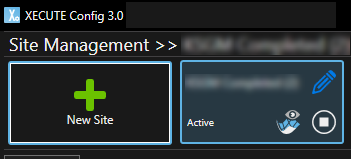
If there are no sites available, you will need to create a New Site.
Within Site Management the following options exist:
- Edit - edit the site configuration by clicking the blue pencil.
- Visualise - visualise the site by clicking the icon with the eye.
- Start/Stop - start or stop the site service by clicking the play button; this toggles the state between Active (running) and Ready (stopped).
- Delete - delete a site by dragging the tile to the waste bin icon.
- System Configuration - set up or edit the system configuration that applies to all sites by clicking the icon.
- Show active sites filter - sites that are not running will be hidden.